Week 1
After first tutorial, I reconsidered my medium
I wanted:
-
- iteration
- technical skill development
- digital fluency
Entering a System-Based Tool, TouchDesigner, that has:
-
- Node-based logic
- Real-time interaction
- System thinking instead of static composition
week 2
In order to understand the software more deeply, I decided to copy an existing work before beginning my own iteration.
I chose this work because its underlying logic appeared clear and analyzable. The animation maps sound to geometric motion, using audio to activate concentric rings that distort typography. The structure seemed simple enough to deconstruct, while still offering complexity for further experimentation.
Step 1: Text Source
Node: Text TOP
Input: “STUCK IN THIS PLACE” (1080×1080)
Step 2: Circular Mask
Node: Circle TOP
Setup: Set Radius to 0.1
Style: Enable Border Width to create a hollow ring
Step 3: The Slice Logic
Nodes: Transform + Multiply
Action: Multiply the Text by the Circle Mask
Result: Text is “sliced” into a single circular band
Step 4: Iteration (x8)
Action: Copy the setup 7 times
Adjustment: Increase Radius for each ring incrementally
Link: All rings share the same original Text TOP
Step 5: Final Composite
Node: Composite TOP
Operation: Set to Add
Output: 8 independent rings merged into one graphic
Then I started to put the audio in:
Step 1. Signal Acquisition & Analysis
Audio Source: Used Audio File In to load the track and Audio Device Out for real-time monitoring.
Spectrum Analysis: Audio Spectrum (audiospect1) converts sound waves into frequency data (Bass to Treble).
Amplitude Boost: Applied Math (math1) with a 30x Multiplier to make the signal strong enough to drive visual motion.
Step 2. Data Refinement & Isolation
Frequency Trimming: Used Trim (trim1) to isolate the most active melodic range (Start: 10, End: 21).
Channel Mapping: Stretch (stretch1) and Shuffle redistributed the raw data into 8 independent channels, one for each ring.
Step 3. Motion Smoothing & Output
Performance Optimization: Inserted Resample to drop the sample rate to 60Hz, matching the screen refresh rate and preventing lag.
Dynamic Response:
Trigger: Created the “pluck” or “jump” effect for each note.
Filter: Smoothed the rotation to ensure the movement felt fluid rather than robotic.
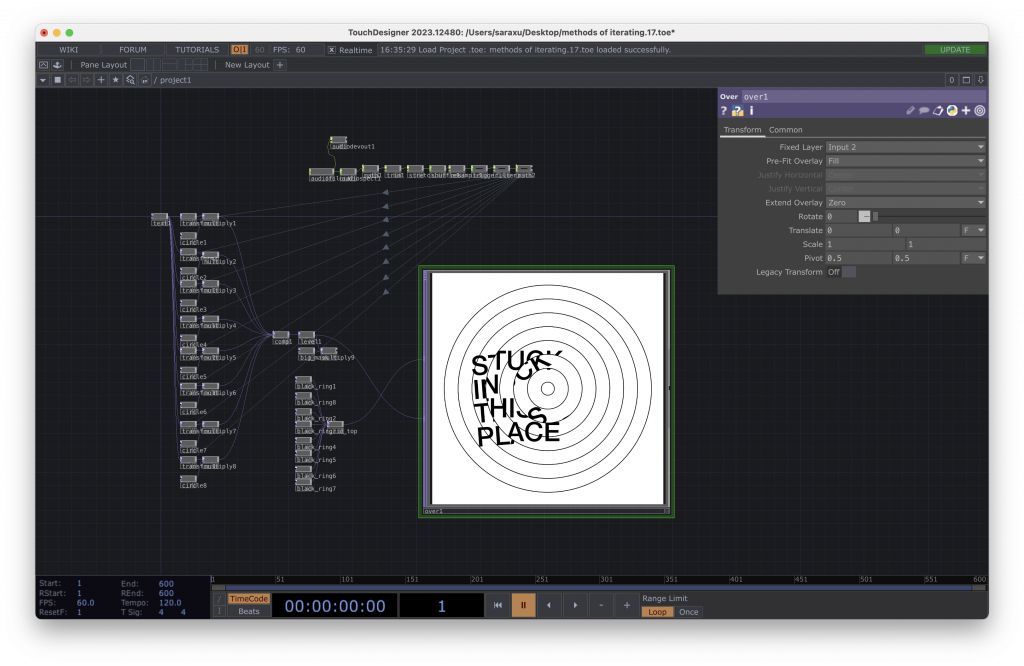
. However, the raw audio created significant “noise,” where overlapping frequencies triggered several rings at once rather than a single note. This conflicted with the reference, which likely uses clean MIDI data to achieve its “one-note-one-ring” precision. To solve this, I moved to After Effects to manually animate the rings using keyframes. While this allowed for perfect visual alignment, it removed the interactivity. The work became a static, pre-rendered animation rather than a living system responding to sound.
I propose a studio experiment that returns to TouchDesigner to embrace the “noise” rather than trying to hide it. Instead of using filter nodes to achieve a “clean” look, I will use these overlapping frequency signals to trigger intentional visual distortions or “glitch” effects.
The goal is to investigate if the “mistakes” of a live signal can create a more interesting visual language than a perfectly controlled manual animation.
High fidelity using After Effects
Step 1. Asset Preparation in Illustrator
Vector Design: Created 8 concentric circles as base layers in Adobe Illustrator.
Text Masking: Used Clipping Masks (Maschera) to embed the typography “STUCK IN THIS PLACE” into each individual ring.
Layer Organization: Exported the file with 8 separate layers, ensuring each ring could be animated independently once imported into AE.
Step 2. Animation & Synchronization
Composition Setup: Imported the Illustrator file as a Composition, maintaining all layer sizes and positions.
Rotation Logic: Applied Rotation Keyframing to each layer to match the rhythmic “plucks” of the audio.
Visual Matching: Carefully timed the degrees of rotation and easing to achieve a 100% visual copy of the original reference animation.
Step 3. Final Refinement
Precision Control: Unlike the “noisy” live signal in TouchDesigner, the manual keyframing in AE allowed for absolute clarity between the sound and the motion.
Leave a Reply